Turnitin Report Example: A Real Similarity and AI Report Sample
Searching for a Turnitin report example usually means one thing: you want to know what your instructor will see before they see it. Below is a complete, real Turnitin report sample, both the similarity report and the AI writing report, generated from one student paper. Every section is explained so you can read your own report with confidence.
The full Turnitin report sample
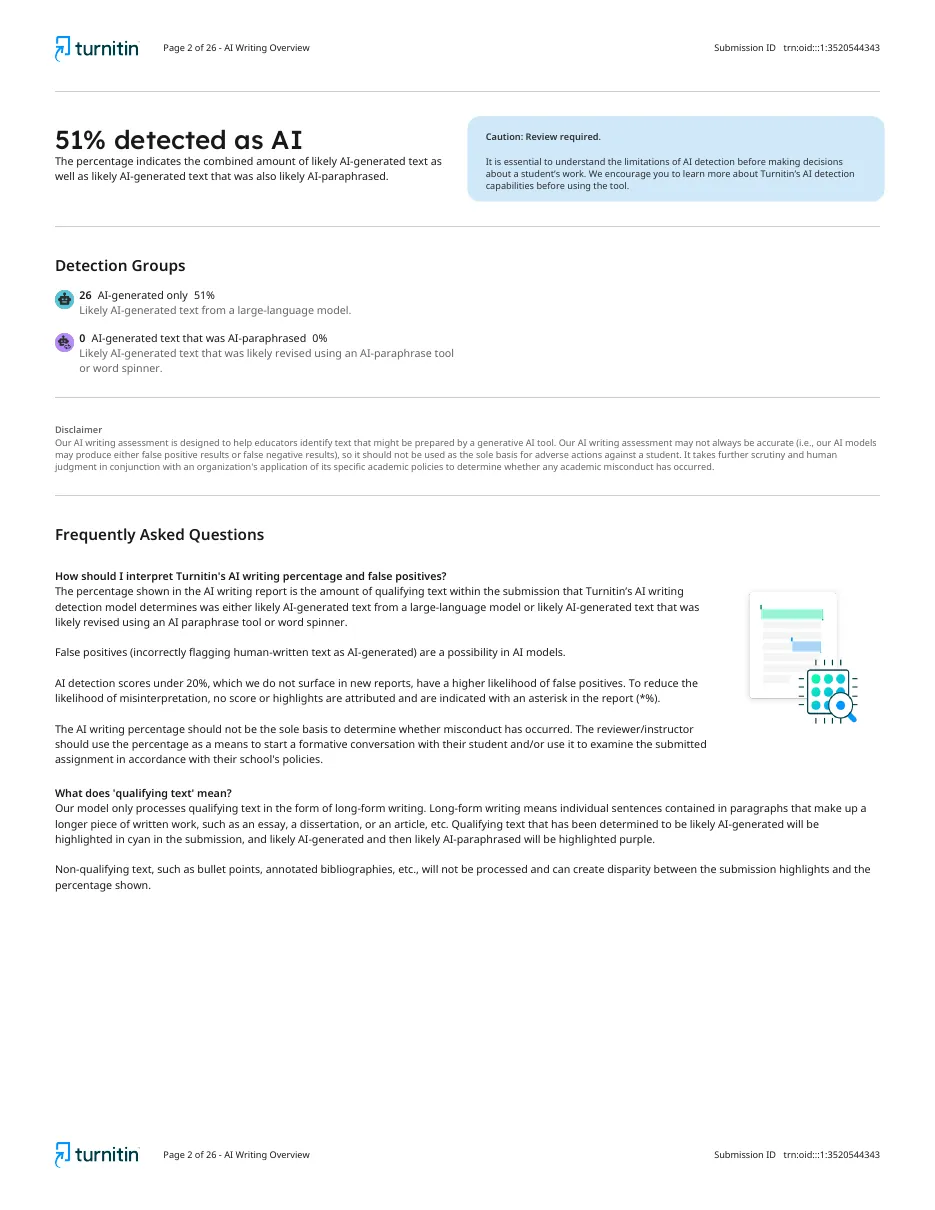
Both screenshots below come from the same 24-page, 6,364-word paper. The similarity report found 1% overall similarity. The AI writing report flagged 51% of the qualifying text as likely AI-generated. Tap either one to see it full size.
Screenshots shown for illustration. Your own reports arrive as full PDFs in your dashboard.
What the sample paper was
The document is a 24-page marketing report of 6,364 words and 37,990 characters, submitted as a Word file. That size is typical of a final-year assignment or a short master's paper. It produced two separate PDFs:
- Similarity report: 27 pages, showing 1% overall similarity.
- AI writing report: 26 pages, showing 51% detected as AI.
The contrast is the most useful lesson in this Turnitin report sample. The paper copied almost nothing, yet half of it reads as machine-generated. A clean similarity score does not protect you from an AI flag, and the reverse is also true.
Page 1: the cover page
Both reports open with the same cover page. It lists the submission ID (a long code beginning with trn:oid), the submission date and time, the download date, the file name, file size, page count, word count and character count. Instructors use this page to confirm the report matches the file you handed in. If you are ever asked to provide your report, this is the page that proves it belongs to your document.
Similarity report example, explained
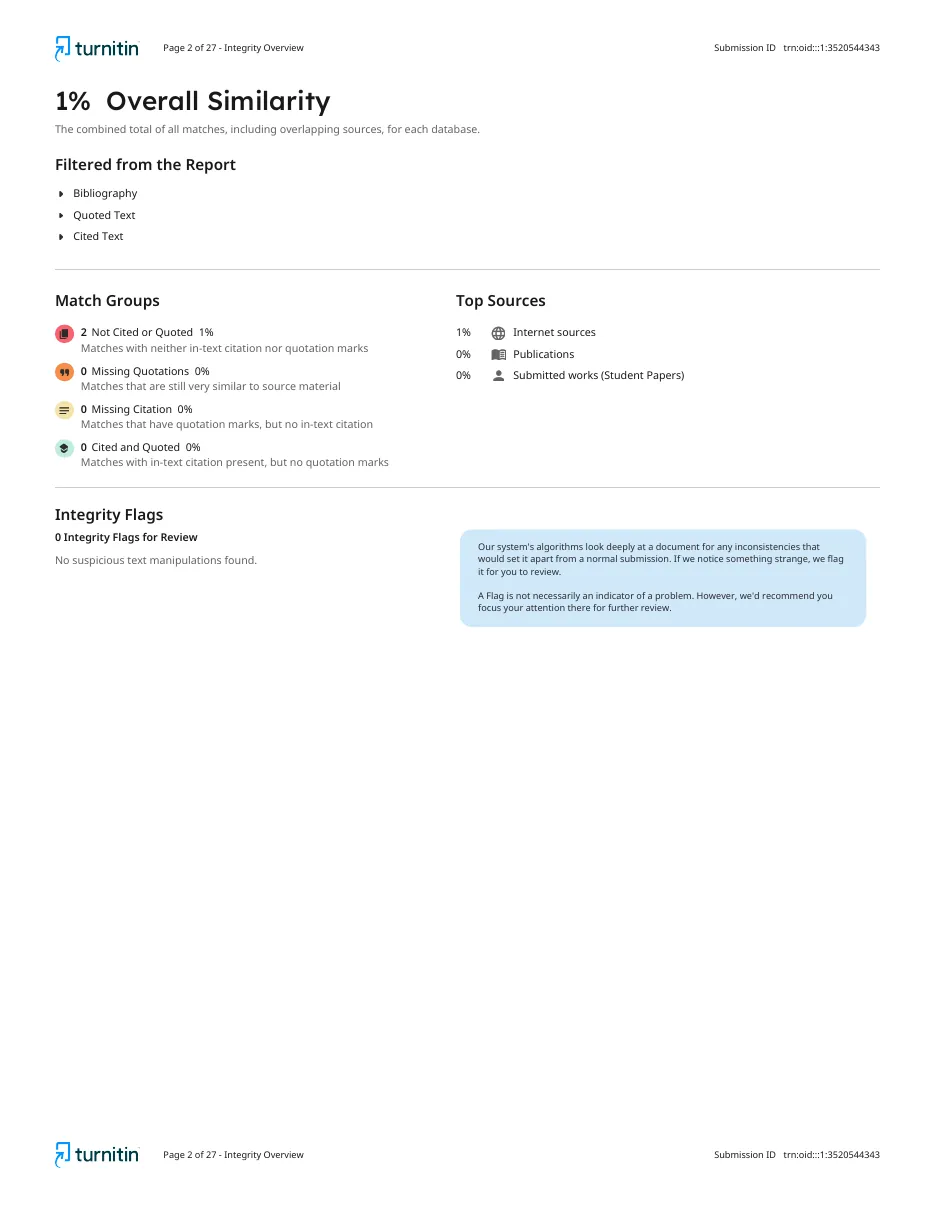
Overall Similarity
The headline number, here 1%, is the combined share of your text that matches sources in Turnitin's databases, including overlapping sources.
Filtered from the Report
This sample excludes the bibliography, quoted text and cited text. Filters matter: the same paper with the reference list included would score higher, because reference entries match other papers that cite the same works.
Match Groups
The newer Turnitin report sorts matches into four groups:
| Match group | Meaning | In this sample |
|---|---|---|
| Not Cited or Quoted | Matching text with no quotation marks and no citation. This is the group instructors look at first. | 2 matches, 1% |
| Missing Quotations | Text still very similar to the source, usually lightly reworded. | 0% |
| Missing Citation | Quoted text with no in-text citation. | 0% |
| Cited and Quoted | Matches handled correctly. | 0% |
Top Sources
The sample lists two internet sources, coursehero.com and link.springer.com, each under 1%. Publications and submitted student papers both show 0%. Source type tells you a lot: a match to another student's submitted paper is treated far more seriously than a short match to a journal article.
Integrity Flags
Turnitin also checks for hidden text, swapped characters and other tricks. This sample shows 0 integrity flags and "No suspicious text manipulations found."
AI writing report example, explained
The AI percentage
"51% detected as AI" is Turnitin's estimate of how much of the qualifying prose was likely produced by a large language model. Qualifying text means long-form sentences in paragraphs. Bullet points, tables, headings and reference lists are not counted.
Detection groups
- AI-generated only: 26 segments, 51%. Text likely produced by an AI model.
- AI-generated text that was AI-paraphrased: 0%. Text that looks AI-written and then run through a paraphrasing tool or word spinner.
Highlighted pages
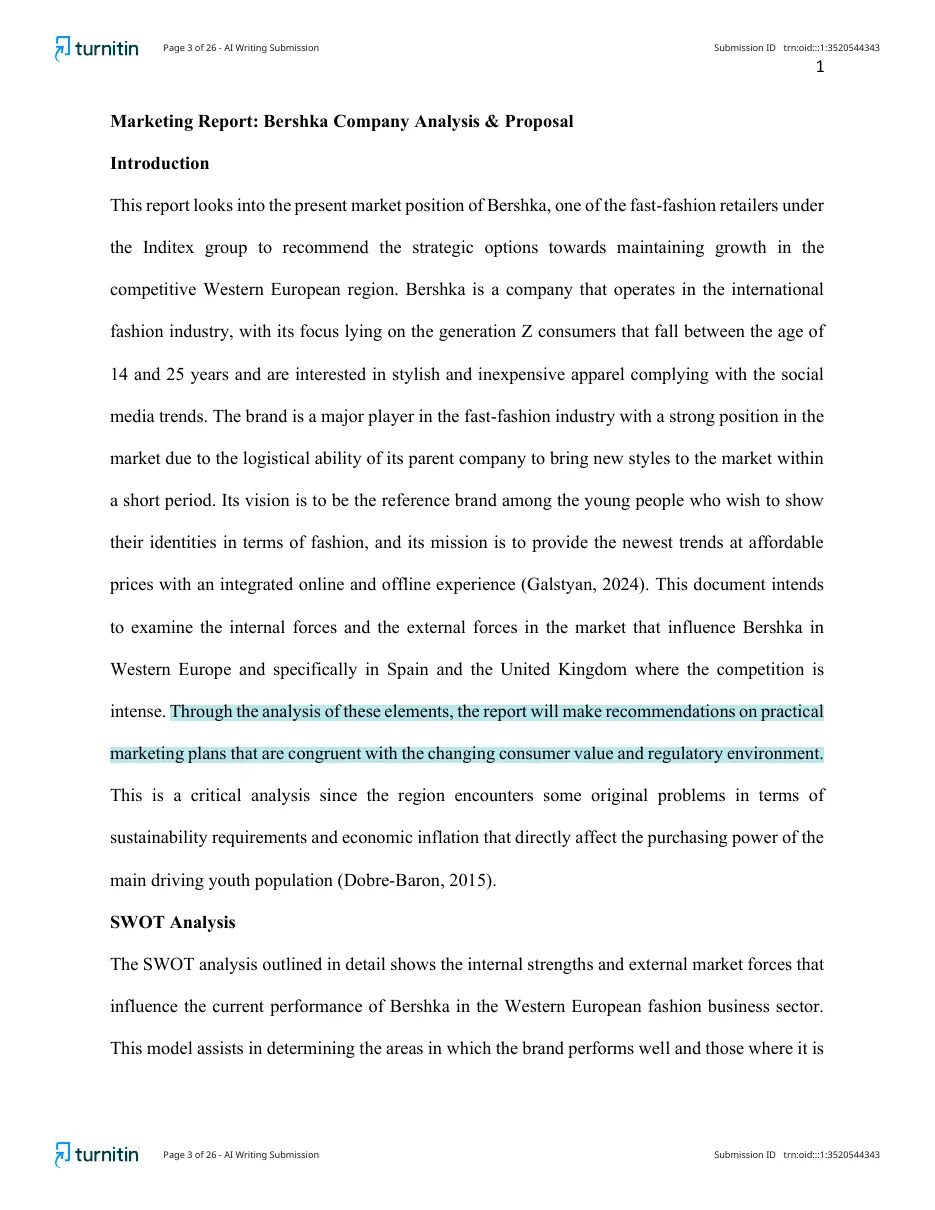
From page 3 onward, the AI report reproduces the paper with flagged sentences highlighted in cyan. Text that was AI-generated and then AI-paraphrased appears in purple. This is where you learn which paragraphs triggered the score.
The disclaimer
Every AI report carries Turnitin's own warning that the model may produce false positives and "should not be used as the sole basis for adverse actions against a student." Keep that in mind if you are ever questioned about a score.
How to use this Turnitin report sample
- Open both screenshots side by side and match each section to the explanations above.
- Read our guide on how to read a Turnitin report for score thresholds and what instructors look for.
- Check what the colours mean in what blue means on a Turnitin report.
- Run your own paper and compare it to this example before you submit.
Frequently asked questions
Is this a real Turnitin report sample?
Yes. Both PDFs on this page are complete reports generated from one 24-page, 6,364-word student paper. You can scroll through every page, from the cover page to the highlighted text.
Why does the sample show 1% similarity but 51% AI?
The two reports measure different things. Similarity looks for text that matches existing sources. The AI writing report estimates how much of the prose looks machine-generated. Original wording can still read as AI-written, so the two numbers often disagree.
Can I get a report like this for my own paper?
Yes. Create an account, upload your document and you receive both a similarity report and an AI writing report in the same PDF format shown here.